Wednesday, November 8, 2017

Buy eBooks

Technical eBooks For Troubleshooting

4 eBooks Package Price 55 USD

Advanced and Professional Techincains Choice for Major Problems of display with other faults including in this ebook  volume1 and volume 2 supported Sharp Sony Samsung Toshiba Philips LG Panasonic and Major Brands Problem Like

LCD LED OLED TV No Display,
Slow Motion Picture
 Grey Or Black Display,
 White Display,
Screen Double Images,
Display Jumping/Jurking,
 Display Distortion, Ghost 
Display Colour Change Solution,
Negative Image,S Solarization 
Horizontal & Vertical Lines/Bars,
Half Screen Display Problem
Mapping , Picture Freezing
Lines removing Method
Ghost Image Also many more
With big collection of
Cof Data including 
No1 eBook


Alright 

I Want This Ebook! What Do I Do Now?”

It’s easy to order. All you need to do is click on the link below, which will take you to the order page, and then you just enter your information in. The whole process only takes a minute or two. As soon as you have placed your order, you’ll immediately sent you through your email address where you can save the Ebook in your computer. And don’t worry, downloading the information is a real snap. (It works perfectly with both MAC and PC computers.) Also for Laptops , Tablets and Android Phones, There is no shipping and handling because it’s an electronic course. That means you won’t have to wait in order to begin using these strategies in your repair business. You can be on your way to success in just a few minutes. Even if you have never downloaded anything from the internet before, don’t worry, it comes with instructions. It’s so easy! All of the Screen Bypassing TV’s problems and solutions are revealed in a step-by-step, easy to understand format. This info-product is one-of-a-kind and not found in any BOOKSTORES!
Go ahead and click the order link below, and see what all the information is about. You’ll get instant access to the entire course even if it’s 4 am in the morning.

Your One-Time Investment Is

Only $55 USD

After Completing Your Payment We Will Send you Volume 1 With in 2 hours to your PayPal email account.
Learn how to repair Panel failures,T-con problem in LCD LED TVs with comprehensive guide line with Schematics and Pictures of Problems, This eBook (PDF) or (Doc)format was written for Advanced Level of Technician of LCD LED and Plasma TV repair and includes many Bypass method. If you want to become expert in this filed of LCD LED TV repair  than this is a good eBook for you. Maybe you have a broken LCD TV sitting at home or your workshop and you want to repair it quickly. No Problem who you are or what your reason is for wanting to repair LCD or LED TVs you have come to the right place.Once you have complete your purchase you will be sent a link to download a copy immediately.
Volume 1 ,
Volume 2 ,
Inverter Bypass eBook,
SMD Data Guide eBook.
Full package buying option 
1.LCD LED TV Panel Bypassing eBook Volume 1 Price Single eBook 20USD

Product Details:E-book Volume1 Format: Ms Office Doc Photo Guide (Not a hard copy book)
Pages: over 169pages (+ Bonuses)
File size: 24MB
Language: English
Bonus: Included Email Support and Bonuses of LCD/LED Panel repairing information!
Compatible with: Android Phones, PC, Laptop & MAC Computer
Price: $20 USD (Offer Price only!)
(Orignal price $39.95 USD)


2.LCD LED TV Panel Bypassing eBook
Volume 2 Price Single eBook 20USD
Product Details:E-book Volume2 Format: Ms Office Doc file with Photo(Not a hard copy book)
Pages: over 150 pages (+ Bonuses)
File size: 13MB
Language: English
Bonus: Included Email Support and Bonuses of LCD/LED Panel repairing information!
Compatible with: Android Phones, PC, Laptop & MAC Computer
Price: $20 USD (Offer Price only!)
(Orignal price $30 USD)


3.LCD LED TV Backlight Bypassing eBook Price 10 USD

Product Details:Backlight Bypassing eBook 1 Format: Ms Office Doc file (Not a hard copy book)
Pages: over 24 pages (+ Bonuses)
File size: 3.6MB
Language: English
Bonus: Included Email Support and Bonuses of LCD/LED Panel repairing information!
Compatible with: Android Phones, PC, Laptop & MAC Computer
Price: $10 USD (Offer Price only!)
(Orignal price $20 USD)


4. SMD Codes DataBook full Version 1060 Pages Price 10USD


Product Details:E-book SMD Data Format: Ms Office Doc file (Not a hard copy book)
Pages: over 1060 pages (+ Bonuses)
File size: 12 MB
Language: English
Bonus: Included Email Support and Bonuses of LCD/LED Panel repairing information!
Compatible with: Android Phones, PC, Laptop & MAC Computer
Price: $10 USD (Offer Price only!)(Orignal price $14 USD)


LCD LED OLED TV Boards Are Available:

SAMSUNG:
UA39EH5003RXZN.
UA40H5140AR.
UA40F5500AM.
UA46B6000VR.
UA32J4100AR.
UA28J4100AR.
UA32K4000AK.
UA32EH6030R.
UA32EH4500M.
UA32ES5500MX.
UA32EH4000RX.
UA32EH4003R.
UA32EH4003W.
UA40H4200AR(PW ONLY
UA32FH4005R.
UA32F4000AMX.
UA24J4100(PW ONLY
UA23H4003
UA24H4003AR.
UA26EH4800R.
UA32D4000
UA32C4000PM.
UA22ES5005.
LA40B550K1M.
LA37A550P1R.
LA32D580K4R.
LA32D550K1M.
LA32D450A2.
LA32B352F3.
LE32D400E1W.
LA32D450G1.
LA32C450E1LXL.
LA32A450C.
LA40A330J.

SONY::
KDL_42W674A.
KDL_46X3500.
KDL_32W700B.
KDL_42W900B(PW ONLY
KDL_46HX950.
KDL_46EX520.
KDL_40EX520.
KDL_42EX410(PW ONLY
KLV_40S550A.
KLV_40BX420.
KLV_40V300A
KDL_32EX420.
KDL_32EX520.
KLV_32V300A.
KLV_26V300A.
KLV_24P413D.
KLV_32EX300.
KLV_32BX32O.
KLV_32T550A.
KLV_32EX310.
KLV_32CX350.
KLV-32S200A(PW ONLY
KLV_32EX350.

LG::
42LB550A.
42LS5700.
42LB6520.
42LN5120.
43LF540A.
39LN5110.
42LE5300.
32LN4900.
32LH520D.
32LB582B(PW ONLY
32LD340.
32LH20R.
32LK311.
32LN541B.
32LB530A(PW ONLY
42LK450(PW ONLY
22LK311.
22LF480A.
32LG80FR.(PW ONLY

PANASONIC::
TH_49E400D.
TH_L32SV7D.
TH_32A401D.
TH_22D400DX.
TH_L32X24D.
TH_L32C4S.
TH_32C400S.
TH_L32B6M.
TH_L29B6DX.
TH_32A300K.
TH_L32C33D(PW ONLY
TH_32X30D(PW ONLY

MICROMAX&HITACHI::
50B6000FHD.
32T6175MHD.
32T2820HD.
32B200HD.
32T28BKHD.
32B8100MHD.
20B22HD.
32T2222HD.
LE22TF07A.
LD39HK08A.
AFLED3295HD.
SOUNDBAR-4032.
GEESTAR_1910
MITSONIC-3232FHD
HYTV3200LED5.
SGDLED-3250C.
LLOYD_L20AM.
CROWN-LE20.
EUROSTAR _T32LED-J14
29E50-(PW ONLY

TOSHIBA::
50L2300VE.
32P1300VE.
32PB10E.
32PB2E.
32PB1E.
32AV700E.
32HV10ZE.
19HV10ZE.

PHILIPS::
32PFL5203/98
32PFL5306/V7
26TA2800.
29FLA4738/V7
19PFL4738/V7
22PFL5237/V7
40FA4509/98(PW ONLY

HAIER::
LE32B8000.
LE19B610.
LE22T1000H.
LE32B9100.

INDEX::
LEDTV-3220.
LEDTV-3108.
LEDTV_3105T.

VIDEOCON::
LEDTVVJU40FH11.XAF
LEDTVVVAE42FH.MMB
LEDTVVVKC40FH.ZM.
LCDTVSAN32HB.EFA
LCDTVRL24HPL.
LCDTVVVRL32HPP.FLA
LCDTVVVI22FM.
LCDTVSAN22HB. 

👆🏻This All Model board available.
 For International And Local Buyers 

TCL LED TV Service Mode

For more Details Please Contact Imran Ashraf +923139292880 or Email us at 
lcdledebooks@gmail.com

Tuesday, November 7, 2017

Access Samsung

There are many codes available for accessing service menu in various Samsung TV models. You can try following codes one by one until you get access to service menu:

First power off your TV using the remote, then press following buttons quickly on the remote:

Mute + 1 + 8 + 2 + Power
Display/Info + Menu + Mute + Power
Display/Info + P.STD + Mute + Power
P.STD + Help + Sleep + Power
P.STD + Menu + Sleep + Power
Sleep + P.STD + Mute + Power

You can press Channel Up/Down buttons to navigate between available options. To change their values, press Volume Up/Down buttons.

In stby position

Display/info+menu+mute+power

Liquid Crystal History

The history and development of the Liquid Crystal Display (LCD) is rather complex. The story of the LCD had an unusual beginning by an Austrian botanist in the 19th century. Though the LCD made a different and unstable start, its development proceeded from early successes like the pocket calculator to the key milestone of a flat panel television display that can be hung on a wall. The origin and development of the LCD spans the world’s major industrial centers including the US, Japan and Europe.

Liquid Crystals – Discovery

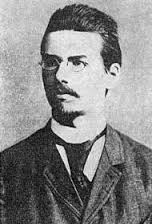
Friedrich Reinitzer
Friedrich Reinitzer
Liquid crystals were first observed by an Austrian botanist, Friedrich Reinitzer, in the year 1888. He discovered a strange material that exhibited a mesophase between the solid state and liquid state. At a temperature of 145 degree Celsius, it melted, probably becoming white and viscous. When he increased the temperature to 179 degree Celsius, it became isotropic and clear. The material discovered by him was cholesteryl benzoate. Regarding this, he wrote a letter to Otto Lehmann, professor of Physics at the Technical University Karlsruhe of Germany on 14th of March, 1889. In the letter, he had written in detail about the two melting points. Lehmann studied the material comprehensively and discovered that the liquid at the mesophase was found to exhibit a double refraction effect, which is a characteristic of a crystal. As the material had the characteristics of both liquid and crystal, Lehmann named it “fliessende krystalle” and the English equivalent name “liquid crystal” was ultimately born.

The Then-unpopular Liquid Crystals

These liquid crystals were not popular among the scientists and researchers in the early 20th century; in fact, the material remained an element of scientific curiosity for nearly 80 long years. Here, it should be mentioned that E. Merck of Darmstadt, Germany sold liquid crystals as early as 1907 for analytical purposes. Even in the early 1960s, only a few institutions and corporations were involved in research on these liquid crystals. The conditions for designing liquid crystals with particular physical properties hardly existed and naturally, no one was motivated to use these in a commercial product. Eventually, liquid crystals remained unknown to the common man.

The Early Breakthrough – Williams Domain

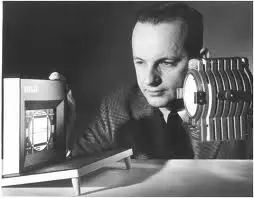
Richard Williams
Richard Williams
The development of LCDs began at the RCA Laboratories in Princeton, New Jersey. In the year 1962, an RCA researcher Richard Williams discovered that liquid crystals exhibited some interesting electro-optic characteristics. Williams generated stripe patterns in a thin layer of liquid crystal material by applying voltage. The pattern produced consisted of long parallel regions which he referred to as “domains.”
Williams concluded that the domains were generated due to ordering the liquid of a kind that had previously not been recognized. He demonstrated the possibility of liquid crystals as electro-optical elements for display devices. This, indeed, was a forerunner of the LCD. The phenomenon discovered by Williams is now referred to as the “Williams domain.”

The Major Breakthrough in the LCD Technology – The Role of George H Heilmeier

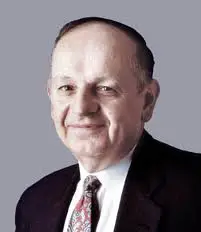
George H Heilmeier
George H Heilmeier
In the year 1961, George H. Heilmeier was a young talent who had just completed his written and oral examination for the Ph.D. degree at the Princeton University. RCA Laboratories sponsored his studies. In fact, in those days, there was a big demand for young engineers and scientists. RCA Laboratories recruited and encouraged the best talents and financed their graduate education simultaneously enabling them to work part time at their laboratory on sensible research projects. In the first two years, Heilmeier worked in the then emerging field of solid state microwave devices. Nevertheless, being an ambitious and passionate young scientist, he was in a dilemma whether he should stay in the well established solid state microwave field or enter the more interesting and risky field of organic semiconductors. It was around that time that Heilmeier was pulled towards the experiments on the Williams domain.

Guest-Host Mode

Heilmeier worked sincerely on the Williams domain and after great efforts, he proposed the guest-host mode. The device was drawing a small amount of electric current, less than a microwatt of power per square centimeter and it was capable of switching color with voltages substantially smaller than those of the CRTs, that is, less than 10 V for liquid crystal dye mixture versus more than 1000 V for CRTs!! This was demonstrated in the fall of 1964. Heilmeier predicted that a wall sized flat panel color television was just round the corner. However, it took about a quarter century for his thought to be realized.
When Heilmeier showcased this effect within the lab, the people there became really excited. Vladimir Zworkin, the father of television, heard about the experiment and called Heilmeier to his office to know why people in the RCA were so excited. Heilmeier elaborated on how he had “stumbled” onto the guest-host color switching effect. Zworkin made a remarkable reply: “Stumbled perhaps, but to stumble, one must be moving.” In 1982, the guest-host mode combined with an AM drive was used in a wristwatch television!!
The Successful Dynamic Scattering Mode
Despite a lot of appreciations, there were several problems with the guest-host effect. The dyes used and their liquid crystal hosts did not remain stable for long periods of time in applied fields; besides, the effect was sensitive to surface orientation effects and needed heating to maintain the host in its nematic phase. Scientists at the RCA tried solving these problems in all ways possible.
It was in late 1964 that they observed an interesting effect in several classes of nematic liquid crystals, those with n-type. The materials that gave the best performance were found to be the members of a class of organic compounds called Schiff’s bases. They found the compound anisylidene para-aminophenylacetate (APAPA) to be of specific interest. Its nematic range was from 83 to 100 degree Celsius. In an applied field, these materials seemed to exhibit a remarkable turbulence that they turned milky white from transparent white. Perhaps, the milk white appearance did not require any polarizer to observe; it was merely a light scattering effect.
Heilmeier found a very efficient way to control the reflection of light by electronic means. The rise time of 1-5 ms and decay times of less than 30 ms together with DC operating voltages in the 10-100 V range made the new mode quite attractive for applications like alphanumeric indicators. He was able to demonstrate reflective contrast ratios of better than 15 to 1 with efficiencies of 45 % of the standard white. He referred to this phenomenon as DSM; With DSM as the basis, he achieved the first operational liquid crystal display. This was, in fact, the first demonstration to show that the so-called vague materials called liquid crystals could be made into something useful. And, voila! The LCD was born!!
Heilmeier was inducted in the National Inventors Hall of Fame and was credited with the invention of LCD or the Liquid Crystal Display.
In May 1968, RCA held a press conference and announced the proud discovery of a completely new type of electronic display which was significantly different from the traditional CRTs. The new display was lightweight, consumed very little electrical power and was slim and sleek. The conference captured the attention of industrial and scientific communities across the globe. This announcement led to the development of digital watches in the US, Japan, and Germany as well as the work on pocket calculators in Japan. At the same point of time, it also led to further research work in Switzerland, the UK and Germany, specifically, for the production of new liquid crystal materials that would be appropriate for use in various display applications.

Drawbacks of Heilmeier’s LCD

As mentioned earlier, LCD developed by Heilmeier employed what he called DSM wherein an electrical charge is applied that rearranges the molecules resulting in scattering of light. This DSM design performed poorly and seemed to be too power hungry; eventually, this design was replaced by a much improved version invented by James Fergason in the year 1969.

Improved Version of LCD by James Fergason

James Fergason, an Associate Director at the Kent State University’s Liquid Crystal Institute, was creating a liquid-crystal-based breast cancer screening apparatus in the 1960s. It was during this time that he made the discovery that formed the basis of his best invention. As we know, the liquid crystal displays developed in RCA labs applied voltage in dynamic scattering mode; it consumed much power with meager results. In 1969, Fergason utilized his “twisted nematic field effect” discovery of liquid crystals to channel the current through the crystals effectively, ultimately resulting in displays that provided excellent contrast and long life on minimal power.
Twisted nematic liquid crystal displays were unquestionably superior to the earlier dynamic scattering displays, and soon became popular. The technology was patented in the United States by Fergason in the year 1971. Fergason formed his own company, ILIXCO or International Liquid Crystal Company, in 1968 to manufacture liquid crystal displays. His first customers were the Bulova Watch Company and Gruen Watch Company which employed the technology to market the first LCD watches that used this technology. By the end of the decade, most of the world’s digital watches employed this kind of LCD display.
LCD has seen tremendous development year after year and the annual sales of television with LCD screens are exceeding year after year and with the more and more use of the LCDs, the CRT almost became obsolescent for most purposes.

What is LVDS

What is a LVDS?

LVDS, or low-voltage differential signalling, was introduced in the mid-1990’s and is very popular in computers, where it forms part of very high-speed networks and computer buses. It is a high-speed digital interface that is used for several applications that require high noise immunity and low power consumption for high data rates. LVDS is used in several applications and industries, including commercial and military applications. The LVDS standard provides guidelines defining the electrical characteristics for driver output and receiver input of an LVDS interface. Growing demands for bandwidth have resulted in the development of high performance technologies based on high-speed LVDS connections. Due to the high noise immunity and low power aspects of LVDS and the great quantity of commercial off the shelf LVDS components, several military and aerospace applications have selected LVDS as a robust and long-term solution for high-speed data transmission.


Types of LVDS

There are many different kinds of LVDS and at Future Electronics we stock many of the most common types categorized by data rate, operating temperature range, packaging type and supply voltage. The parametric filters on our website can help refine your search results depending on the specifications required.
The most common sizes for data rate are 155.5 Mbps, 400 Mbps, 800 Mbps, 1.5 Gbps and 3.125 Gbps. We also carry LVDS with data rates up to 10.3125 Mbps. Operating temperature range should also be considered, with several ranges from -65 oC to 150 oC.

LVDS From Future Electronics

Future Electronics has a full selection of LVDS, including LVDS for programming and driver, receiver, transceiver, connector, controller, switch, repeater, mini, dual, transmitter, repeater, deserializer, single channel and optical transmitter receiver units.
We offer LVDS from several manufacturers. Simply choose from the LVDS technical attributes below and your search results will quickly be narrowed to match your specific LVDS application needs.
If you have a preferred brand, we deal with several manufacturers such as Austriamicrosystems, Fairchild, Micrel Semiconductor, National Semiconductor or Pericom. You can easily refine your LVDS product search results by clicking your preferred LVDS brand below from our list of manufacturers.

Applications for LVDS:

LVDS are designed to be used for applications including flat panel displays that use an LVDS connection to the graphics card as well as for high data transmission in printers, digital copiers and cell phones. Due to its low noise emission and high noise rejection characteristics, LVDS is a reliable choice for military and aerospace applications. LVDS interfaces are used for avionic communications and surveillance to protect the integrity of the transmitted signals.

Choosing the Right LVDS:

When you are looking for the right LVDS, with the Google parametric search, you can filter the results by various attributes: by data rate (155.5 Mbps, 400 Mbps, 800 Mbps, 1.5 Gbps, 3.125 Gbps,…), operating temperature range (from as low as -65 oC to as high as 150 oC) and supply voltage (up to 5.5V) to name a few. You will be able to find the right LVDS for programming and driver, dual, transmitter, repeater, deserializer, receiver, transceiver, connector, controller, switch, repeater, mini, optical transmitter receiver and single channel units using these filters.

LVDS in Production Ready Packaging or R&D Quantities

If the quantity of LVDS required is less than a full reel, we offer to our customers several of our LVDS products in tube, tray or individual quantities that will avoid unneeded surplus.
In addition, Future Electronics offers its clients a unique bonded inventory program designed to eliminate potential problems that may arise from an unpredictable supply of products containing raw metals and products with long or erratic lead times. Talk with your nearest Future Electronics branch and find out more on how you and your company can avoid possible shortages.

Sunday, October 29, 2017

LED TV Screen Panel Repair


Monday, October 23, 2017

TCL Service Mode LED TV Software's


TCL Service Mode Avalaible Very Soon +923139292880


Tuesday, June 13, 2017

JuST FOR THE KNOWLEDGE

JuST FOR THE KNOWLEDGE*

1. *PAN* - permanent account number.
2. *PDF* - portable document format.
3. *SIM* - Subscriber Identity Module.
4. *ATM* - Automated Teller machine.
5. *IFSC* - Indian Financial System Code.
6. *FSSAI(Fssai)* - Food Safety & Standards Authority of India.
7. *Wi-Fi* - Wireless fidelity.
8. *GOOGLE* - Global Organization Of Oriented Group Language Of Earth.
9. *YAHOO* - Yet Another Hierarchical Officious Oracle.
10. *WINDOW* - Wide Interactive Network Development for Office work Solution.
11. *COMPUTER* - Common Oriented Machine. Particularly United and used under Technical and Educational Research.
12. *VIRUS* - Vital Information Resources Under Siege.
13. *UMTS* - Universal Mobile Telecommunicati ons System.
14. *AMOLED* - Active-matrix organic light-emitting diode.
15. *OLED* - Organic light-emitting diode.
16. *IMEI* - International Mobile Equipment Identity.
17. *ESN* - Electronic Serial Number.
18. *UPS* - Uninterruptible power supply.
19. *HDMI* - High-Definition Multimedia Interface.
20. *VPN* - Virtual private network.
21. *APN* - Access Point Name.
22. *LED* - Light emitting diode.
23. *DLNA* - Digital Living Network Alliance.
24. *RAM* - Random access memory.
25. *ROM* - Read only memory.
26. *VGA* - Video Graphics Array.
27. *QVGA* - Quarter Video Graphics Array.
28. *WVGA* - Wide video graphics array.
29. *WXGA* - Widescreen Extended Graphics Array.
30. *USB* - Universal serial Bus.
31. *WLAN* - Wireless Local Area Network.
32. *PPI* - Pixels Per Inch.
33. *LCD* - Liquid Crystal Display.
34. *HSDPA* - High speed down-link packet access.
35. *HSUPA* - High-Speed Uplink Packet Access.
36. *HSPA* - High Speed Packet Access.
37. *GPRS* - General Packet Radio Service.
38. *EDGE* - Enhanced Data Rates for Globa Evolution.
39. *NFC* - Near field communication.
40. *OTG* - On-the-go.
41. *S-LCD* - Super Liquid Crystal Display.
42. *O.S* - Operating system.
43. *SNS* - Social network service.
44. *H.S* - HOTSPOT.
45. *P.O.I* - Point of interest.
46. *GPS* - Global Positioning System.
47. *DVD* - Digital Video Disk.
48. *DTP* - Desk top publishing.
49. *DNSE* - Digital natural sound engine.
50. *OVI* - Ohio Video Intranet.
51. *CDMA* - Code Division Multiple Access.
52. *WCDMA* - Wide-band Code Division Multiple Access.
53. *GSM* - Global System for Mobile Communications.
54. *DIVX* - Digital internet video access.
55. *APK* - Authenticated public key.
56. *J2ME* - Java 2 micro edition.
57. *SIS* - Installation source.
58. *DELL* - Digital electronic link library.
59. *ACER* - Acquisition Collaboration Experimentation Reflection.
60. *RSS* - Really simple syndication.
61. *TFT* - Thin film transistor.
62. *AMR*- Adaptive Multi-Rate.
63. *MPEG* - moving pictures experts group.
64. *IVRS* - Interactive Voice Response System.
65. *HP* - Hewlett Packard.

*Do we know actual full form of some words???* 
66. *News paper =* 
_North East West South past and present events report._
67. *Chess =*
_Chariot, Horse, Elephant, Soldiers._
68. *Cold =*
_Chronic Obstructive Lung Disease._
69. *Joke =*
_Joy of Kids Entertainment._
70. *Aim =*
_Ambition in Mind._
71. *Date =*
_Day and Time Evolution._
72. *Eat =*
_Energy and Taste._
73. *Tea =*
_Taste and Energy Admitted._
74. *Pen =*
_Power Enriched in Nib._
75. *Smile =*
_Sweet Memories in Lips Expression._
76. *etc. =*
_End of Thinking Capacity_
77. *OK =*
_Objection Killed_
78. *Or =*
_Orl Korec (Greek Word)_
79. *Bye =*♥
_Be with you Everytime._


Monday, June 12, 2017

LCD LED TV Software's Avalaible

LCD LED TV Software Are Available With PayPal and Credit Card .
Received Your required Software within 24 hour by your giving email address or contact us at lcdledebooks@gmail.com

1.China Universal TV Board V59.031 all resolutions​ Get it Now.


2.China Universal TV Board ITV V59.031.13 all resolutions​ get Now.


3.China Universal TV Board TR85.031 all resolutions​ Get it Now.


4.China Universal TV Board VST56.U11.2 all resolutions​ for Sony Get it Now.


5.China Universal TV Board VST56.U11.2 all resolutions​ for Samsung Get it Now.


6.China Universal TV Board VST56.U11.2 all resolutions​ for LG Get  it Now.


7.China Universal TV Board VST56.03 all resolutions get Now.


8.China Universal TV Board VST.59c all resolutions​ get Now.

9.China Universal TV Board V59 PB16 get Now.

10.China Universal TV Board TP.MS338. PC821 Full Upgrade Version Get It Now.

11.T.MS18VG.72B.12023 (3) Softwares Pack Avalaible Just 10 USD Get it now


12.Software for V56U.B48 main board Software are available.

Other Combo Boards Softwares Also Available.


Buy Now These Software's as a package deal with Paypal and Credit Card With Full Protection.
Software List 
Haier All Models
Changhong Ruba
EchoStar
 LE32B3500 Smart
LE40B8000
TP.RT2982.PB801 
PANDA LC390TU1A 
TR85.031
VST.V59.031
V.TV9G.02
T.AM7633M.671
HV320.PB801
TP.VST59-P81
TP.VST59-P83
T VST56.U112
TP.VST59.P91
TP.VST59.PB631
TP.VST59.PB716
TP.VST59.PB726
TP.VST59.PB768
TP.VST59.PB813
TP.VST59.PC815
TPMS608.P83
VST59.PB813
TPSIS231.P83 Hisense
TPSIS231.PT851G
CV182.H-F
CV.MV26L.G
CV9202H-TPW
---------------------------------------------------------
Software Package 

100% Working Tested


TR85.031 V1 
TR85.031, V9 New 2018
TR85.816
VST3463
V59.031 All
VST59.81
VST59.A10
VST59.03B
VST59.11
VST59S.21
V.TV9A SONY 
VST29.03
LAMV29 5Key
LAMV29 7Key
VST39.01A
V56.03 2016
V56.03 2017 Ver
V56.03 2018 Ver
V56.U11.2 Samsung Logo Remote
V56.U11.2 Sony Logo Remote 
V56,U11.2 LG Logo Remote 
RTD2668
CV3463
CV628-B42
MSD338STV 5.0
VST56.PB816
VST56.PB819
VST56.PB801
VST56.PB671
VST56.PB673
VST56.PB716

And Many Other Useful Software in LCD LED Repairing 
100% Orignal Factory Software's 
From China .


Sony Samsung LG Haier Philips Changhong Ruba Sharp Toshiba Videocon Intex TCL China Universal and Other Major Brands Software's are available for more details please WhatsApp us or email us.


Also buy single range software in just 10 USD for more details please contact us at +923139292880
Or email us at lcdledebooks@gmail.com


Thursday, April 20, 2017

Progressive and Interlaced Scanning

There has been a lot of talk recently about the differences between interlaced and progressive scanning in digital video. This article isn’t meant to be an in depth technical explanation of the specific details, but instead a brief explanation of the most important points for filmmakers who are not interested in the in depth technical explanation but instead are interested in how the two shooting standards will have an impact on their films.

If you decide to do further research on this subject you should understand the vocabulary and short forms that are used. First of all, you often see “i” to represent interlaced and “p” to represent progressive. For example: 480p or 480i.
Interlaced scanning
Interlaced scanning is simply displaying alternating sets of lines. First even numbered lines are displayed and then odd numbered lines are displayed. Each even set of lines are displayed for 1/60th of a second and then the odd lines are displayed for 1/60th of a second. This process is repeated over and over again. Each time an odd number series of lines are displayed it is called a “field”. The same name is given to the even set of lines. Because each field happens so quickly we are given the illusion of a whole image. However, we are only being presented with half an image and very quickly after that we are presented with the other half of the image as shown in this figure.


Progressive video on the other hand displays the entire image in 1/60th of a second.
The consequences of using interlaced are predictable. Because you’re only capturing half of the image at a time, movement within the frame (due to either camera movement or subject movement) may cause motion artifacts. This happens especially when the movement is quick enough to cause noticeably different positions of the fields. For example, if you’re filming interlaced from a moving car you’ll notice motion artifacts.
Progressive scanning
Progressive video, as stated above captures 1 entire image per frame. This means you’ll avoid the problem of motion artefacts. That being said, progressive video is not mainstream yet because it’s more expensive. However, there are a few camera models that are reasonably affordable for independent filmmakers. For about $3000  you can get the Panasonic AG-DVX100 which shoots progressive video. The Canon XL-2 is another option for shooting progressive video.


Progressive video is desired by independent filmmakers because the look of progressive resembles the look of film. Progressive scanning results in a clearer image and as mentioned above, progressive scanning handles movement differently. The cameras mentioned above also have the ability to shoot 24p which also helps give your video the “film look” making it desirable to many filmmakers.


LCD LED TV Screen Panel Repair And Bypassing Method By Imran Ashraf.


Toshiba LCD LED TV Service Mode

TOSHIBA Entrance to the service menu: # Turn on the TV and press the MUTE button on the remote.Further, the MENU button on the TV cabinet while MUTE button on the remote. # Press the key "9" once and see in the top line of the operating time. # By pressing "9" on several occasions looking type of matrix. # Press AV input call screen of blue, red, green colors. Warning:the key "2" is not pressed in any case !!! (reason not specified, but according to unconfirmed reports is included white calibration mode) Exit - turn off the TV with the "network". By Imran Ashraf